
Cloning Datasets
Learn how to reuse existing Datasets from other projects.

Cloning datasets from other projects not only saves time but also ensures consistency in managing tags and tasks. Cloned datasets inherit the icons, settings, and metadata fields from the original, making them quick and easy to set up. To do this, you must have the Dataset Administrator role.
Here's how.
- Open the Project Management page from the Project Navbar.
- Select Manage Datasets.
- Click the '+ New Dataset' button.
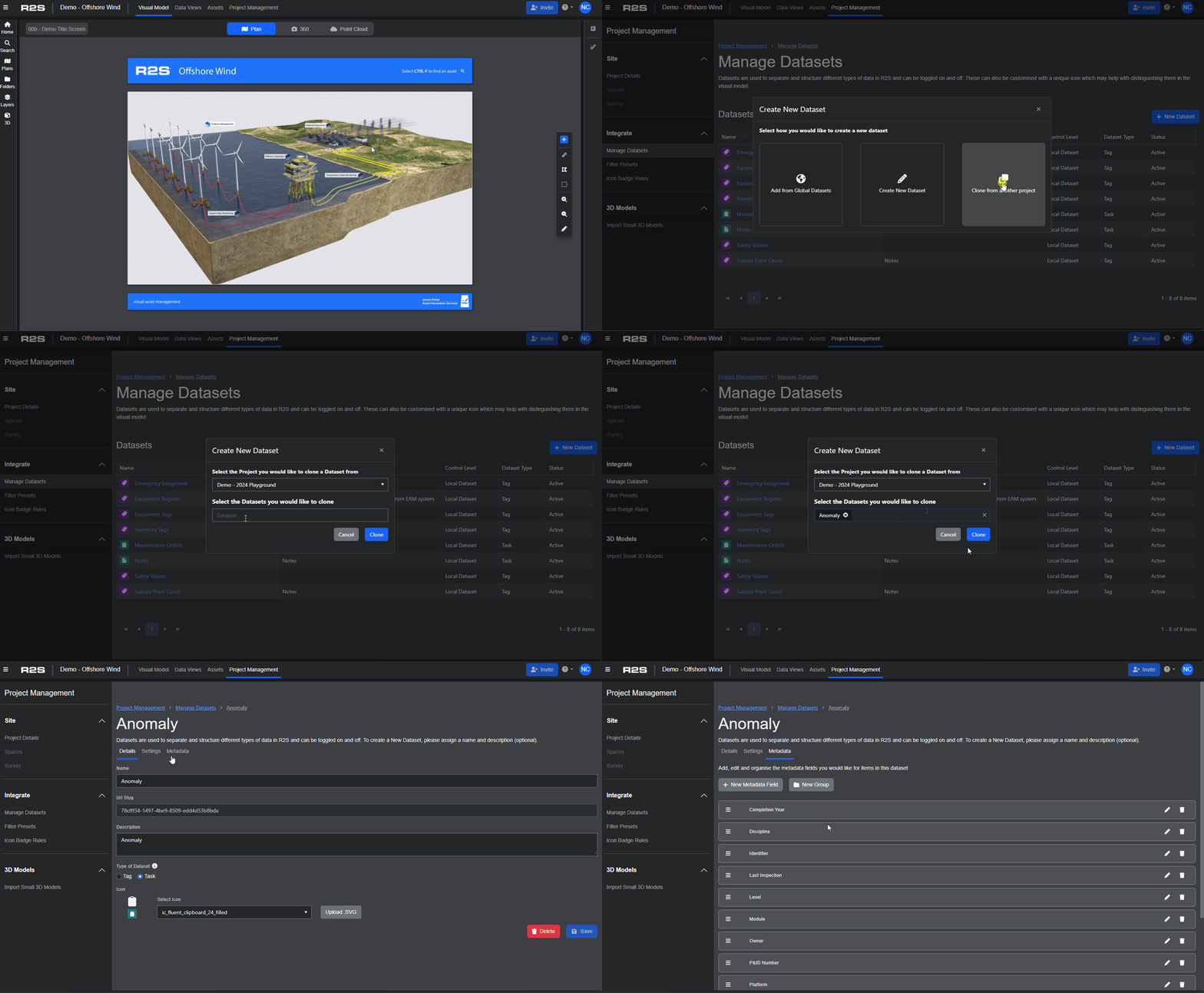
- Select 'Clone from another project'.
- Choose the project you want to clone the dataset from using the dropdown list.
- Select the Dataset you want to clone (you can make multiple sections if required).
- Click the 'Clone' button to add the Dataset to your project.
This short video demonstrates how to clone the 'Anomaly' dataset for use in the current project.
Note: A cloned dataset can still be edited to suit the specific requirements of your team or workflow.
Follow these links to discover alternative ways to add Datasets to your project.
To see how Datasets are used in R2S, see the Tags and Tasks page.
Note: If you are having trouble using any tool or feature in R2S please contact our support team here.